

Integrating OpenAI into Your Software Lifecycle
Updated: May 13
Why Software Development OpenAI Integration Is Now a Baseline Expectation

Software development OpenAI integration is the process of connecting your applications, tools, or workflows to OpenAI's API so your software can generate text, analyze images, write code, answer questions, and automate complex tasks — all powered by large language models (LLMs).
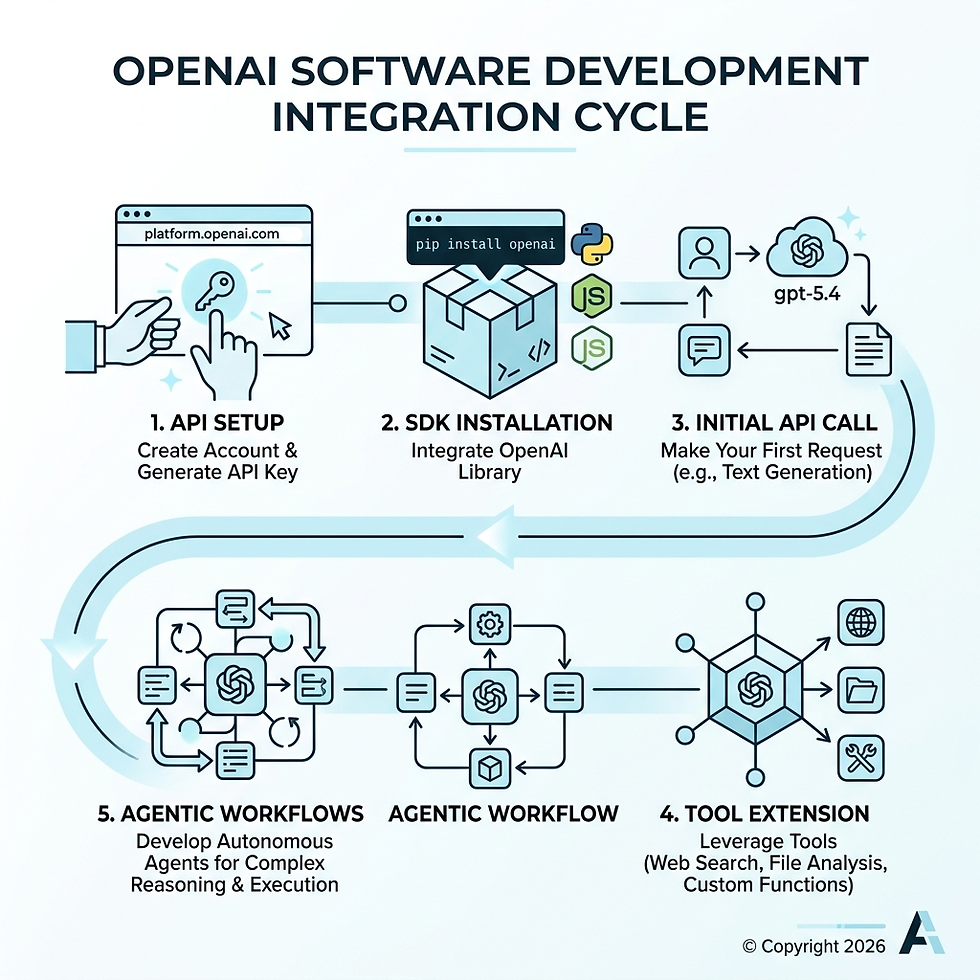
Here's the short version of how it works:
Create an OpenAI account at platform.openai.com and generate an API key
Install the OpenAI SDK for your language (Python, JavaScript, etc.)
Make your first API call using the Responses API with a model like gpt-5.4
Extend with tools like web search, file analysis, or custom function calling
Build toward agents that can handle multi-step tasks autonomously
That's the core loop. The rest is about doing it well — securely, efficiently, and at scale.
The pace of adoption here is hard to overstate. ChatGPT reached 100 million monthly users in just two months — a milestone that took Instagram two and a half years. Developers are no longer asking whether to integrate AI into their software. They're asking how fast they can do it without breaking things.
And the gap is widening. Teams using AI coding agents are compressing weeks of work into days. As of August 2025, leading models can sustain over two hours of continuous, autonomous reasoning — and that capability doubles roughly every seven months. For small businesses already stretched thin on development resources, this is either a massive opportunity or a growing competitive disadvantage.
The good news: you don't need a massive engineering team or an ML background to get started. OpenAI's API is designed for developers who want powerful AI without building it from scratch.
I'm Carlos Cortez, a senior technology consultant and co-founder of S9 Consulting, where I've spent years helping businesses integrate custom software, automation, and AI-driven workflows — including hands-on software development OpenAI integration — into their operations. In this guide, I'll walk you through everything you need to implement OpenAI in your software lifecycle, from first API call to production-ready agentic systems.
The OpenAI Ecosystem: Models and Core Capabilities
When we talk about the OpenAI ecosystem, we aren't just talking about a single chatbot. We're looking at an extensive API Platform that offers a suite of models, each with specialized strengths.

The current heavy hitters in the lineup include GPT-4o, the latest GPT-5.4, and the specialized Codex models. These models are multimodal, meaning they don't just "read" text; they can "see" images, "hear" audio, and "understand" structured data like code.
GPT-4o: The versatile flagship model. It's fast, multimodal, and handles most general-purpose tasks with high reasoning.
GPT-5.4: The frontier of intelligence. This model is designed for high-reasoning tasks, complex problem solving, and advanced agentic behavior.
Codex: Our favorite for engineering. It is a dedicated coding agent that powers tools like GitHub Copilot and can be integrated directly into your CI/CD pipelines or IDEs.
OpenAI Model Comparison Table
Model | Primary Use Case | Key Strength |
GPT-4o | General Chat & Vision | Fast, cost-effective, multimodal |
GPT-5.4 | Complex Reasoning | Deep logic, long-context tasks |
Codex | Software Engineering | Agentic coding, refactoring, unit tests |
Selecting the Right Model for Your Use Case
One of the biggest mistakes we see in software development OpenAI integration is using a "sledgehammer" model for a "thumbtack" task. If you are building a simple sentiment analysis tool, you don't need the high reasoning effort (and higher cost) of GPT-5.4.
When selecting a model, we consider three factors:
Reasoning Effort: Does the task require deep logic or just pattern matching?
Latency: Do your users need a response in milliseconds, or can they wait for a background process?
Context Window: How much data (tokens) do you need to feed the model at once?
For those needing a tailored approach, our Bespoke Software Development Service helps identify the exact model architecture for your specific business goals.
Understanding the Responses API
OpenAI recently introduced the Responses API, which has become the new standard for interacting with their models. It simplifies the input structure by using clear message roles:
System: Sets the "personality" or "guardrails" of the model.
User: The prompt or data provided by the end-user.
Assistant: The model's previous responses in a conversation.
This structured approach allows for different content types, including text, image URLs, and file IDs, all in a single call. You can find more details in the official developer quickstart.
Technical Setup and Software Development OpenAI Integration
Before you write your first line of code, you need a secure foundation. We’ve seen many developers accidentally leak their API keys by hardcoding them into their source code—a mistake that can lead to thousands of dollars in unauthorized usage.
Secure Key Management and Authentication
The first rule of software development OpenAI integration: Never put your API key in a client-side file (like a React component). Always keep it on the server.
Create your key: Head to the OpenAI dashboard and generate a secret key.
Use Environment Variables: Store your key in an .zshrc configuration file or a .env file on your server.
Export the variable: In your terminal, you would typically use export OPENAI_API_KEY='your_key_here'.
By using environment variables, the official OpenAI SDKs for Python and TypeScript will automatically detect the key, keeping your code clean and secure. For a deeper dive into modern dev practices, check out our Custom Software Development Complete Guide.
Best Practices for Software Development OpenAI Integration
Once your environment is set up, you need to handle the "real world" of API communication. APIs can fail, and rate limits are a reality. We recommend:
Error Handling: Use try-catch blocks to catch RateLimitError or AuthenticationError.
Exponential Backoff: If you hit a rate limit, don't just retry immediately. Wait a few seconds, then try again, increasing the wait time with each attempt.
Streaming: For long responses, use the stream: true parameter. This allows your UI to display text as it's being generated, making the app feel much faster to the user.
If you're working with Node.js, the OpenAI SDK for TypeScript and JavaScript is the most robust way to implement these patterns.
Building Agentic Workflows with the Agents SDK
The real magic happens when you move from "chat" to "agents." An AI agent doesn't just talk; it acts. It can search the web, read your database, and even execute code to solve a problem.
OpenAI's Agents SDK is the toolkit that makes this possible. It allows for "agent handoffs," where a general-purpose agent can realize a user wants to book a flight and hand the conversation over to a specialized "Travel Agent" tool.
Implementing Function Calling and Tools
Function calling is the bridge between the LLM and your existing software. You can define a function in your code—say, get_customer_balance(id)—and tell the OpenAI model about it. If a user asks, "How much do I owe?", the model will recognize it needs that function and return a JSON object with the necessary arguments.
Key tools available include:
File Search: Upload PDFs or documents and let the model query them directly.
Web Search: Allow the model to pull real-time data from the internet.
Code Interpreter: Let the model write and run Python code in a secure sandbox to perform math or generate charts.
You can explore these features further via the Agents SDK for Python. For businesses in Boston looking to build these complex systems, our AI Agent Development Services provide the local expertise to get it done right.
Developing Multimodal Applications
Modern software development OpenAI integration isn't limited to text boxes. We are building apps that can:
Analyze Images: Send a photo of a broken part to the API, and have GPT-4o identify the serial number and suggest a replacement.
Process PDFs: Upload a 100-page annual report and ask for a summary of the "Risk Factors" section.
Audio Transcription: Use the Whisper model to transcribe meetings and then use GPT to generate action items.
We discuss these cross-platform strategies in our article on Harnessing the Power of OpenAI and Anthropic in AI Agent Development.
Optimizing the Software Development OpenAI Integration Lifecycle
Integrating AI into your product is one thing; integrating it into your development process is another. This is where the Software Development Life Cycle (SDLC) is being completely transformed.
Transforming Engineering Workflows with Codex
Codex is more than an autocomplete tool. It's a partner that can:
Write Unit Tests: Feed Codex a function, and it can generate a comprehensive test suite in seconds.
Refactor Legacy Code: Ask it to convert an old jQuery script into a modern React component.
Generate Documentation: It can read your code and write the README file you've been putting off for months.
For teams using JetBrains IDEs, you can see this in action by integrating Codex in JetBrains IDEs like IntelliJ or PyCharm. This shift allows engineers to focus on architecture and strategy while delegating the "mechanical" parts of coding to the AI.
Measuring ROI of Software Development OpenAI Integration
Is it worth the cost? At S9 Consulting, we measure ROI through three lenses:
Efficiency Gains: How many hours did we save by automating code reviews or documentation? (Developers spend 2–5 hours a week on reviews; AI can cut this by 50%).
Development Velocity: How much faster are we shipping features? (Some teams report delivering microservices in minutes instead of days).
Token Costs vs. Value: Are we spending $5 in tokens to save $50 in human labor?
Our Software Development services focus on these efficiency metrics to ensure that AI isn't just a "cool feature," but a profitable one. You can read more about this in our AI Agents overview.
Security, Compliance, and Cost Management
As you move toward production, the "boring" stuff becomes the most important. You need to know how much you're spending and how to keep your data safe.
Troubleshooting Common API Issues
If you've spent any time with the OpenAI API, you've seen the errors. Here's a quick cheat sheet:
401 Unauthorized: Check your API key and environment variables.
429 Too Many Requests: You've hit your rate limit. Implement exponential backoff or check your status monitoring page.
500 Internal Server Error: This is on OpenAI's end. Wrap your calls in a retry loop.
If you hit a wall you can't climb, you can always reach out to the official support contact.
Cost Management and Compliance
OpenAI uses a pay-as-you-go pricing plan based on tokens. To keep costs down, we use Prompt Caching. If you send the same 5,000-word context to the model repeatedly, OpenAI will cache it and charge you significantly less for subsequent requests.
From a compliance standpoint, ensure you are meeting GDPR and CCPA requirements. OpenAI does not use data submitted via the API to train its models for Enterprise and Team plans, which is a critical security feature for our clients.
Frequently Asked Questions about OpenAI Integration
Should I use my own API keys or user-supplied keys?
This is a common debate in SaaS development.
Your Own Keys: You have total control over the experience, but you bear the full cost. This is best for internal tools or premium features where you bake the AI cost into your subscription price.
User-Supplied Keys: The user enters their own API key. This removes your cost burden and allows for higher personalization, but it adds friction to the user experience.
We often recommend a hybrid approach: start with your own keys for a trial period, then offer a "bring your own key" (BYOK) option for power users.
How do I handle data privacy in production?
Always follow the principle of Data Minimization. Don't send personal identifiable information (PII) like social security numbers or private addresses to the API unless absolutely necessary. Use anonymization techniques—replace "John Doe" with "User_123"—before the data leaves your server.
What is the future of OpenAI API development?
The future is "Agentic Commerce." We are moving toward a world where AI agents don't just recommend products; they have the authority to buy them. Task length capabilities are doubling every seven months, meaning we will soon see agents capable of handling 10+ hours of continuous work. For forward-thinking founders, OpenAI for startups offers resources to stay ahead of this curve.
Conclusion
Software development OpenAI integration is no longer a luxury for tech giants. It is a standard tool for any business that wants to remain competitive in a digital-first economy. Whether you are in Boston, MA, the ability to automate your processes, integrate your systems, and improve overall efficiency is now at your fingertips.
At S9 Consulting, we don't just build apps; we build long-term partnerships. We help you navigate the complexities of model selection, secure authentication, and ROI measurement so you can focus on what you do best: growing your business.
Ready to take the next step? Build AI agents for your business with us and start transforming your software lifecycle today.


